





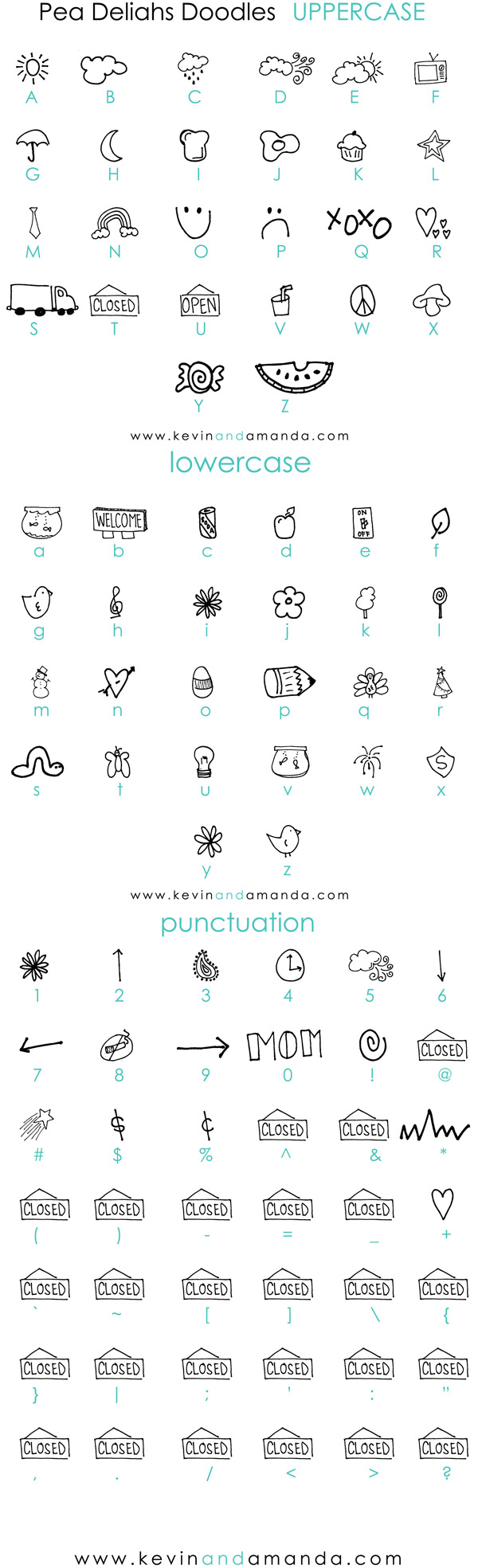
*Not all doodles shown above. Complete doodle chart shown below. Feel free to repost these charts on your site/blog.
This font chart is brought to you by:

crafts
*Not all doodles shown above. Complete doodle chart shown below. Feel free to repost these charts on your site/blog.


*Click this button to download the entire collection of Fonts for Peas fonts in a single download.

If you like handwriting fonts, you’ll love these scrapbooking fonts! More free fonts from Kevin & Amanda at Free Scrapbook Fonts!

Awww … this link isn’t working either :(
not working for me either… sad! Hopefully it will work soon- so cute!
*doh* Are they working now?? :)
Amanda…
how do I download the doodle chart? (which keys do I use to make each doodle?
thanx!
Laura
Yea! Working now! Thanks Amanda – love these!!
Hey I was tried hitting the download all fonts at one time button, and it let me download them, but then when I went to extract the files it came up with the files and folders so it said there were already files with those names. I was wondering if there was any other way around that so I didn’t have to keep downloading them one by one. Thanks a bunch!
Rachel
p.s.- I took your advice and used the background from shabbyblogs and made a recipe blog, I would love for you to visit it, and I hope you don’t mind if I refer to some of your recipes, of course I will give you the credit, I just want to make sure it is okay.
When I download this the font file didn’t come with…. Perhaps I am doing something wrong.
Cool idea and site. I tweeted about it https://www.twitter.com/burtabreu I had wondered about creating some fonts from doodles and think I may send something along when I have some time.
Oh this is too cute!!! Thank you!!
Keep up the good work! I will send my own handwriting and turn it into fonts! :)
thanks for the awesome fonts (: this is truly inspiring and would definitely recommend to everyone, posted your button on my blog ^^ thanks!
Well; WHen i downloaded it; it only had the document that shows what each font will look like; it didn’t have the file FOR the font to be added to ‘FONTS’ in your computor
Hey, the tutorial was great. . . for those of you who can’t find the link here it is: https://www.kevinandamanda.com/scrapbook/fonts/download-and-install/windowsxp.html. I do it a bit different than the tutorial. . . I save it. Open it. On the left there is an extract file. I click that. I change the path, or type in desktop after the c:/. . . FIND THE PLACES ON YOUR COMPUTER FIRST . . . then you can drag and drop. “My Computer” from the start menue opens up showing all the drives. Select C>program files>WINDOWS>FONTS. . . I can drag and drop an extracted file into the font folder. Good luck. I think most computers are the same . . . Mine was a bit different than the tutorial, but after finding all the places mentioned or absent from the tutorial I did it!!! Thanks. Smiles back to you.
Comments on this entry are closed.